CT78.A11.Synth — context file
Series: CT78 Synth · Version: A11 · Date: 2026-11-21 · Built from: CT78.A10.Synth (copied and renamed; A1–A10 unchanged). Read CT78.A10.Synth/CT78.A10.Synth.md for A10's requests 46–64 (tubes, the Doll controls, the smile, the songs, sound while recording, the curls), and CT78.A9.Synth/CT78.A9.Synth.md and CT78.A8.Synth/CT78.A8.Synth.md for earlier work (the doll's pose solver, the instruments). · Project label: F (fantasy / art) · Opus 5.5 (a side session started from another session).
Open issues: ISSUES.html.
© 2026 Michael Wahrman. All rights reserved.
Requests (A11, 2026-11-21)
- Review "C:\Users\micha\Downloads\claude\CT78.A10.Synth\CT78.A10.Synth.md"
- If you can tell if this is playing on a phone, please remove the menu on the right, hide it
- Be sure to make it clear that the user muse tap the window to enable audio and use the mouse or their fingers to spin or get closer to the doll.
(A10's file also used the numbers 63 and 64, for the curls. The numbers above are the ones you gave for A11.)
63. Review of A10 (what I found)
- A10's file matches its code on the points I checked: start view distance 235, the sound notice, the Doll group and the version label.
- I found three problems while testing A11. All three were already in A10. I fixed them because requests 64 and 65 cannot work on a phone without the fixes:
- On a phone the menu could not be closed again. On a narrow screen the open menu lies over the picture and covered the round ☰ button, so a tap on ☰ hit the menu instead. Checked: the element under the button's centre was inside the menu. Only the H key closed it, and a phone has no keyboard.
- On a phone the first tap probably did not start the sound, but the notice went away anyway. A10 started the sound when a finger landed (
pointerdown). Browsers count a touch as permission for sound only when the finger lifts (pointerup / touchend). A10 hid the notice either way. Not checked on a real phone (I have none); this comes from the browser rules.
- There was no way to get closer with fingers. Zoom used the mouse wheel only. On a phone you could turn the view round her but could not get closer.
- Still open from A10 (not touched, listed in issues): the Bubbles button does nothing (0d). The start message also mentions MIDI and the P key, which mean nothing on a phone.
What A11 changed
- On a phone the menu on the right is hidden at the start. A "phone" is any one of: the browser reports a mobile device; the user agent names an iPhone or an Android phone; or a touch screen whose short side is under 600 px. Tablets and desktops still show the menu, as before. The round ☰ button stays on a phone, so the menu can be opened and now closed again: on narrow screens the button now sits above the menu.
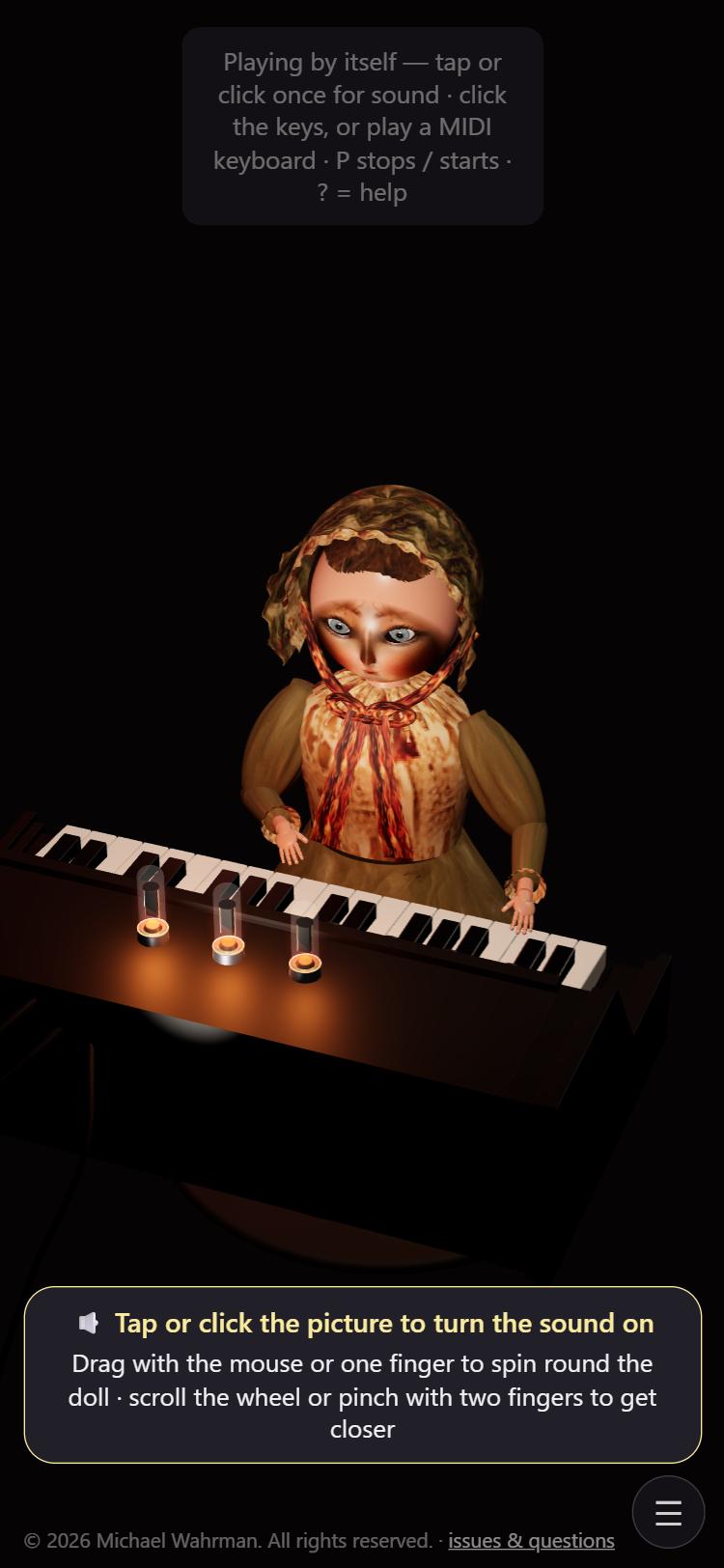
- The notice at the bottom of the picture now has two lines:
- "🔈 Tap or click the picture to turn the sound on" goes away only once the sound is really running, not just because you touched the screen.
- "Drag with the mouse or one finger to spin round the doll · scroll the wheel or pinch with two fingers to get closer" goes away once you have turned or zoomed.
The notice no longer blocks dragging: taps and drags pass through it to the picture. With
?sound=0 only the second line shows.
- A two-finger pinch now zooms. This is new; without it, "use their fingers … to get closer" would not be true. Lifting one finger ends the pinch without turning the view.
- The sound now also starts when a finger lifts at the end of a tap (
pointerup / touchend), not only when it lands (pointerdown).
- The start message, the help page and the hint in the menu now say "tap or click" and mention the pinch.
Checked (2026-11-21, built-in browser, http://127.0.0.1:8781)
node --check passes on every script; no console errors.- Desktop: the menu shows and the notice shows both lines. After one click the sound line went (the sound was running). After a drag the whole notice went. The mouse wheel zoomed (235 → 173) and removed the drag/pinch line.
- Phone size (the browser's mobile preset: 375×812, Android Pixel 8 user agent, touch): the page starts with the menu hidden, there is no sideways scrolling, and the notice fits (351 px wide). After the fix, ☰ opens the menu and closes it again. Picture:
images/CT78.A11.Synth_1_phone_start.jpg.
- Pinch, with simulated touch events: spreading the fingers to 3× their gap took the distance from 235 to 78, and pinching back returned it to 235. The view did not turn during the pinch or after one finger lifted. A one-finger drag of 80 px turned the view 32°.
- Not checked: a real phone (iPhone or Android); whether the first real tap starts the sound on a phone (simulated touches cannot test the browser's sound permission); a tablet; a real two-finger pinch on glass; a phone held sideways (landscape).
Liberties taken (please check)
- "Remove the menu, hide it": I hide it at the start and keep the ☰ button so you can still open it. Say if you want it gone completely on phones, with no ☰.
- Pinch to zoom is new. You asked me to make clear that fingers get closer to the doll; without the pinch that would not have been true.
- The ☰ fix and the sound-on-lift fix were not asked for in words. Requests 64 and 65 need them to work on a phone.
- The drag / pinch line disappears once you have turned or zoomed, so it does not stay over the picture. Say if it should stay longer.
- What counts as a phone (defined above) is my choice: a small touch screen under 600 px counts; tablets do not.
- The wording of the notice is mine.
Files
The same files as A10, renamed CT78.A11.Synth_*.js. Changed: index.html (the notice and its style, the ☰ fix, help and hint text) and CT78.A11.Synth_main.js (phone detection, sound start, pinch, the notice). New: images/CT78.A11.Synth_1_phone_start.jpg. This file, README.md and ISSUES.md are rewritten for A11; their .html twins come from tools/md2html.py.